 stormregion
ChatGPT Image MCP
I love adding some extra assets to my projects to give them some spice. It's not strictly needed, but it makes a solution easier to remember. My favourite style is 8-bit. As I have talked about before, that style hides the "slop" well enough, but doesn't give off negative vibes when it's generated.
I use Minimax H3 for most of the mass-scale image generation, but for one-off images ChatGPT and Sora are way better and faster. They follow specific style hints and keep context. The only problem with that workflow is that it's either API cost (on top of the generic monthly plan) or a manual process. I know it doesn't make sense for them to provide it as an MCP, but that should not stop us from rigging something together.
Chrome extension to interact with a chat
The idea is not new: grab a ChatGPT tab, wire in some automation code, send messages and read the results back. I did something really similar in 2023 during my class, but this time I went the proper way: a Chrome extension.
The extension itself is the "connector". Using simple HTML selectors, it can:
- write messages into the chat
- read messages back
- download images
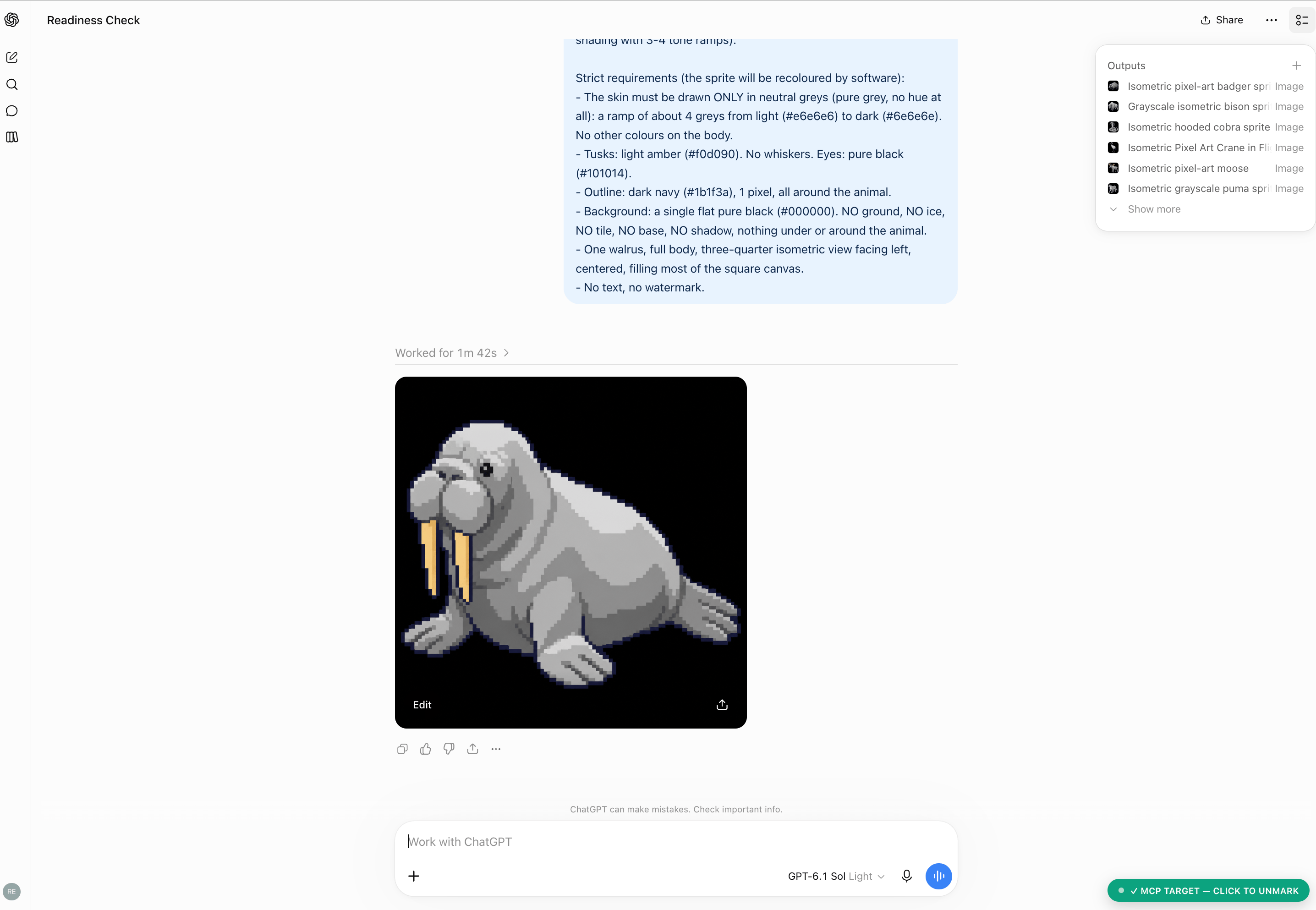
To let the MCP work with the browser, you need to select a specific tab / chat (bottom right of the image). Once that chat / tab is locked, the MCP uses it for all queries. For a context switch, the extension can open a new chat, and by sending a sample query it can check whether the flow is in the receiving state. I used the string "Are you ready?", which, as a side effect, also tags most of those chats as "Ready check" or "Readiness check".
The MCP
Creating the MCP portion is the boring part. @modelcontextprotocol/sdk makes it super simple: throw in the tool definitions, package them into one Node.js project, register it in Claude, for example, and you are done.
Just for fun, here is what a tool definition looks like (actual copy-paste, some bootstrapping is not shown):
server.registerTool(
  "chatgpt_last_message",
  {
    title: "Read ChatGPT's last reply",
    description:
      "Return the newest reply in the marked ChatGPT conversation as markdown, without sending " +
      "anything. Waits if ChatGPT is still answering. Use after chatgpt_ask timed out, or to " +
      "read an answer produced by hand in the tab.",
    inputSchema: {
      timeout_seconds: z.number().int().min(10).max(3600).optional().describe("Default 600."),
      output_dir: z.string().optional(),
    },
  },
  async ({ timeout_seconds = 600, output_dir }) => {
    let res;
    try {
      res = await bridge.call("last", { expectImages: false }, { timeoutMs: timeout_seconds * 1000 });
    } catch (e) {
      return fail(`could not read the last reply: ${e.message}`);
    }
    return textReply(res, output_dir);
  }
);
And the Claude Code wiring:
{
  "mcpServers": {
    "chatgpt-image": {
      "command": "node",
      "args": ["/absolute/path/to/chatgptimagemcp/server/src/index.js"]
    }
  }
}
Routing challenge
The only interesting part, which gave some good old patterns a new shine, was selecting a leader in a distributed system and orchestrating multiple clients. Man, these bring back memories of the good old university days.
Why the heck do we need this in the first place? The way the system is built, the Chrome extension connects to a local port, and not the other way around, to keep the extension simple. This simplification brings another problem: on the MCP side, only one process can listen on a specific port. That works great, as long as you don't want to use it from multiple sessions. :D
When multiple sessions exist, the first MCP gets the port and can communicate with the extension, while everyone else fails at the socket listen. That failure is the trigger for another mode inside the MCP: the second instance connects to the first and asks it to proxy requests over to the extension.
If the "first" MCP instance dies for some reason, which can be as simple as ending the session, a leader election starts. It does the same "dance" as the first round: try to listen on the port, and fall back to being a peer if that fails.
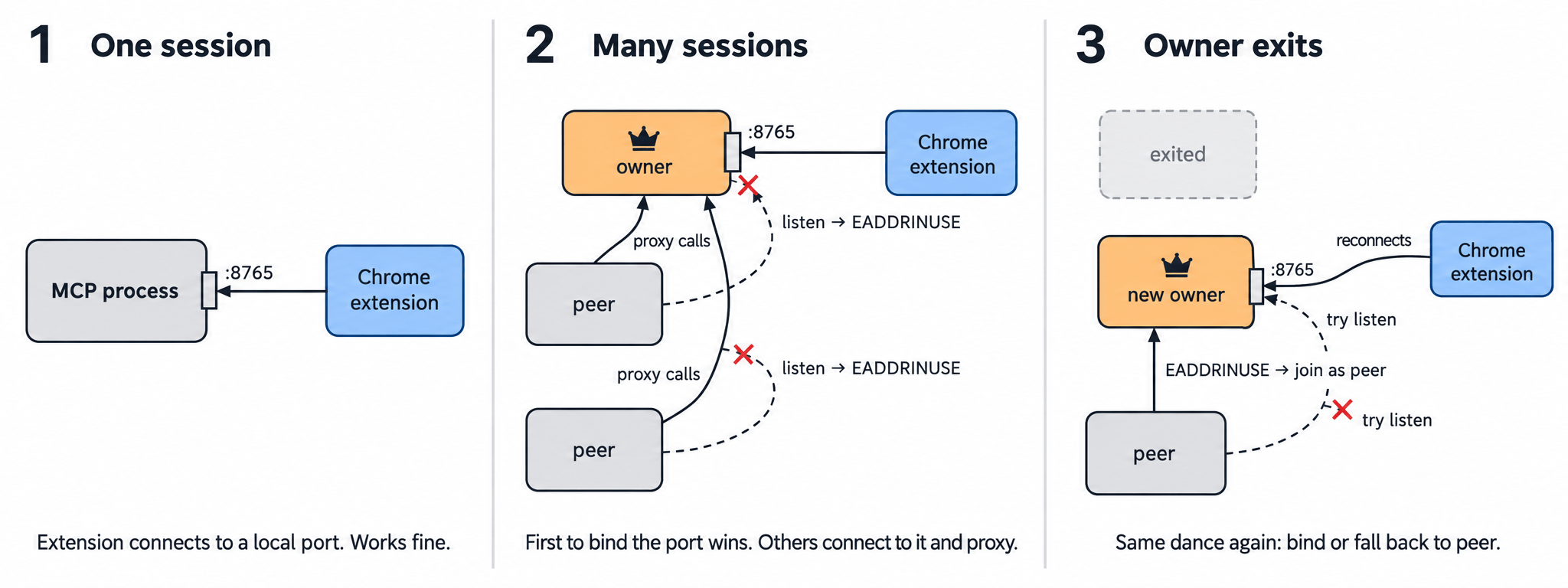
Of course, the image was generated using the same flow. :D
Conclusion and remarks for others
Sometimes the more boring projects are the most useful. Since I built this MCP, I have used it almost every time I need "just a small graphic" or a rendered UML chart. The project is relatively easy to reimplement, so sharing the source does not make sense (and there is a bit of a "can I even do that considering the TOS?" question). Things not mentioned above are refusals and rate limits, and the fact that after 20-30 images in one chat the solution becomes less reliable, even if you scroll, etc. Maybe it's running the tab in the background, or some timing issue; I'm not sure. My solution is to open a new chat and keep grinding. :D